
Easy Clinic Knowledgebase for Seamless Healthcare Workflows
The Easy Clinic Knowledgebase is your self-service help hub: a searchable library of step-by-step guides, how-to articles and troubleshooting tips for every part of the EasyClinic clinic management software. Whether you’re setting up your clinic for the first time or fine-tuning an advanced workflow, you’ll find clear, up-to-date answers about the EMR software here, any time of day.
What is the Easy Clinic Knowledgebase ?
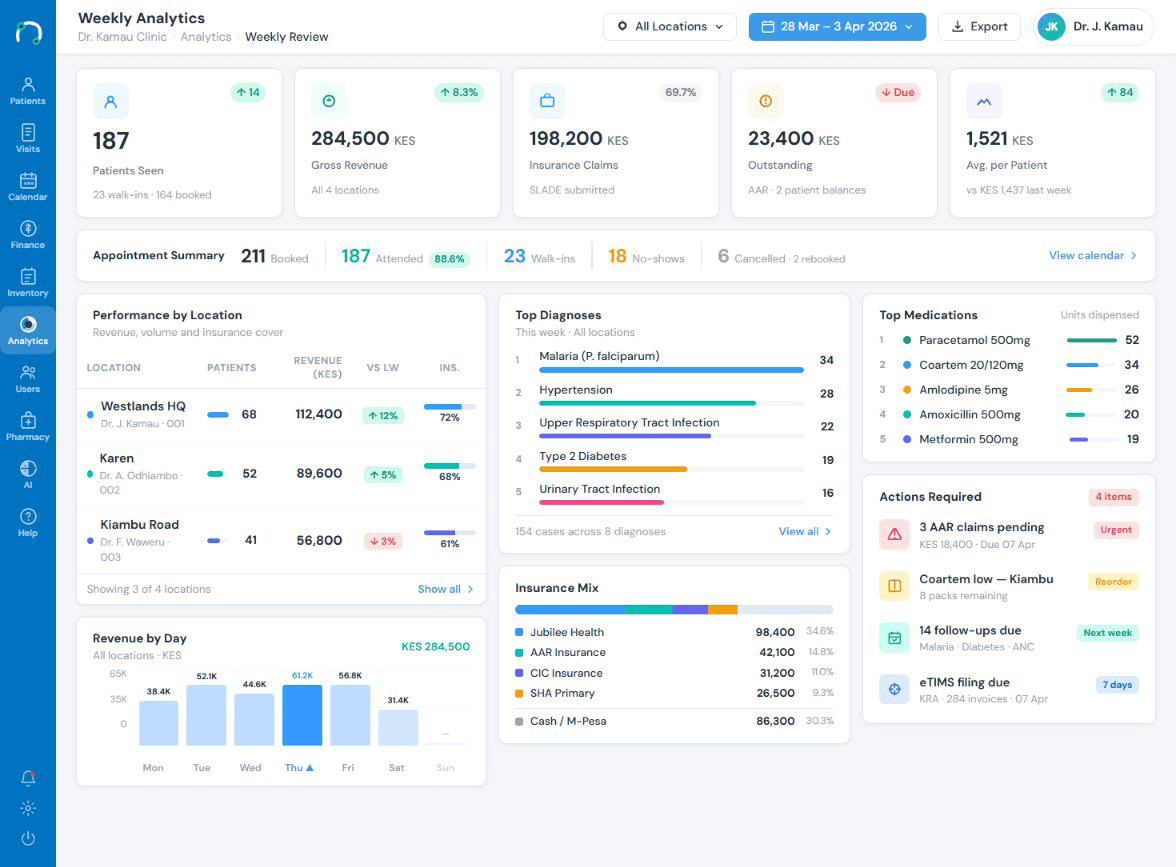
The Knowledgebase is the official documentation for Easy Clinic, the AI-powered EMR software and clinic management software used by 5,000+ doctors across 200 cities. It explains how each module works, from the EMR and prescriptions to billing, inventory, pharmacy, lab, appointments and patient engagement, in plain language with screenshots and short guides you can follow at your own pace. Think of it as the manual for your EMR software that is always current and always one search away.
- Step-by-step how-to guides for every feature of the clinic management software.
- Troubleshooting tips that help you resolve common questions without waiting.
- Setup and onboarding articles to get your clinic live quickly.
- Best-practice notes so you get more out of your EHR software over time.
Why use the Knowledgebase before you call support
Self-service is often the fastest route to an answer. The Knowledgebase lets you solve a question in the moment, with no ticket and no wait, while keeping our support team free for issues that truly need a human. For a busy clinic, good documentation is part of what makes clinic management software easy to live with day to day, and it is what makes the EMR software approachable for a brand-new user.
- Centralized Patient Records Access
- Automated Scheduling & Billing
- Integrated Clinic Management Software
- Real-Time Analytics & Insights
- Built-in WhatsApp, SMS,email
- Offline access that syncs when back online
Browse the Knowledgebase by category
Getting Started
Account setup, clinic configuration, adding users and going live on your new clinic management software.
- Clinic setup
- Adding doctors and staff
- User roles and access
- Your first prescription
EMR & Prescriptions
Everything about the electronic medical record: recording visits, the 30-second prescription, custom templates and AI-assisted documentation inside your EMR software.
- Point-and-click charting
- Custom examination forms
- Multilingual prescriptions
- Drug-interaction checks
Appointments & Scheduling
Managing the calendar, walk-ins, automated reminders, teleconsultation slots and the waiting room.
- Booking appointments
- Automated reminders
- Waiting-room dashboard
- Online self-booking
Billing, Payments & Accounting
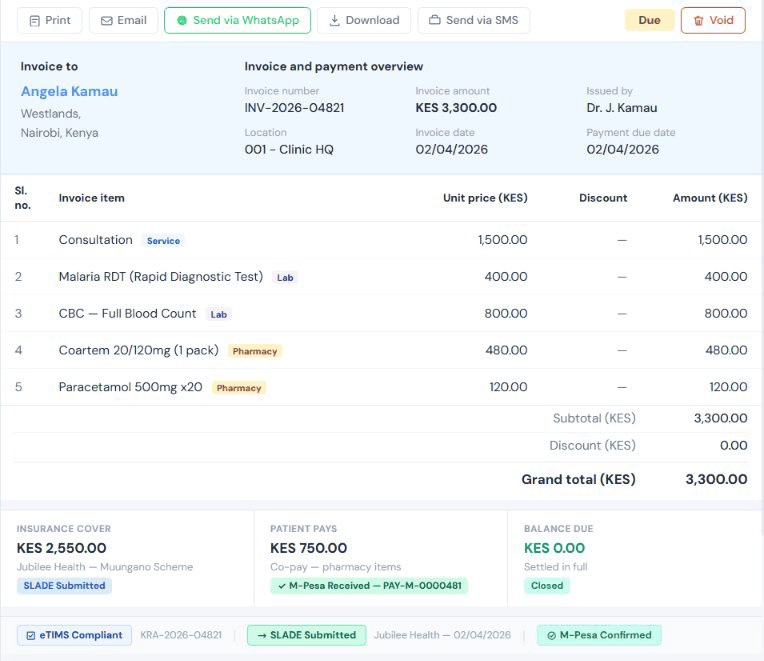
One-click billing, online and offline payments, price lists, taxes and financial reports.
- Quick bill
- Part and advance payments
- Multi-level price lists
- Profit and loss reports
Inventory, Logistics & Pharmacy
Stock control, purchase orders, dispensing and expiry management across your clinic management software.
- Stock tracking
- Reorder alerts
- Pharmacy dispensing
- Barcode support
Lab & Investigations
Ordering tests, sample workflows, result templates and abnormal-value flagging.
- Lab order routing
- Result templates
- Device integration
- Graphical results
When to use the Knowledgebase vs. contacting support
Use the Knowledgebase for how-to and setup questions you can act on yourself, and contact support for account-specific, billing or urgent issues.
How to find what you need
Start with a search, then narrow by category. The fastest path to an answer usually looks like this:
- Type a keyword, a feature name, an error, or a task into the search bar
- Scan the suggested articles and open the closest match
- If you're browsing, pick the module category that matches your task
- Follow the step-by-step guide; most include screenshots
- Still stuck? Contact support with the article link so we can help faster
- Follow the step-by-step guides to resolve common issues quickly.
Can't find what you're looking for ?
Open the full Knowledgebase for the complete library of guides, or get in touch, and a real person will help you get the most from your EMR software.
Knowledgebase questions answers
Is the EasyClinic Knowledgebase free to use?
Yes. The Knowledgebase is free and open to all Easy Clinic users. You can read every guide for the clinic management software without logging in, any time you need it.
Do I need to be a customer to read the guides?
No. Anyone evaluating EasyClinic can browse the Knowledgebase to see how the EMR software works before booking a demo. It is a transparent look at day-to-day use.
How often is the documentation updated?
Articles are reviewed and updated as features change, so the guidance reflects the current version of the software. When a module is improved, its help articles are refreshed alongside it, which keeps the EHR software guidance trustworthy.
What is the difference between EMR software and EHR software here?
In everyday use, the terms overlap. Easy Clinic is an EMR software platform that also maintains a longitudinal patient record, which is what people often mean by EHR software. The Knowledgebase covers both the record-keeping and the wider clinic management software features.
Can my whole team use the Knowledgebase?
Yes, and it is a good idea. New reception, nursing and pharmacy staff can learn their part of the clinic management software from the same guides, which keeps everyone consistent.
What if I can't find an answer?
Reach out to our support team at hello@easyclinic.io with the details and, ideally, a link to the closest article. We will help directly and, where useful, add a new guide.